📣

What's new

Product updates, shipped. Here's what changed in PaperTight, newest first.

16 July 2026

Bulk review actions

You can now clear a whole review queue in one pass. Select any number of submitted documents from Awaiting Review — or from a single package — and approve or reject them together instead of opening each one.

When you reject in bulk, the comment you write is carried to every document in the selection, so each company sees exactly why their file came back and what to fix. Bulk actions are available on the Professional and Enterprise tiers — see plans and features for the full list.

Awaiting Review · 3 selected✓ Approve allReject all
TimesheetGulfCrew · Jul
Salary SheetMeridian Staffing · Jul
InvoiceCrewLine · Jul
SOAWorkBridge · Jul
18 June 2026

A branded client portal

The client portal — where each company logs in to see and upload only its own documents — can now wear your brand. On the higher tiers you can add your logo and set the portal's accent colours, so the people you invite land somewhere that looks like an extension of your business, not a generic login.

Nothing changes about how portal access is billed: portal users stay free and never count toward your member limit, no matter how many companies you invite.

🏗️GulfCrew Manpower — Document Portal
Monthly Billing Pack · Jul2 to upload
Gate Pass Pack · JulAll approved

14 May 2026

Auto-Gen packages

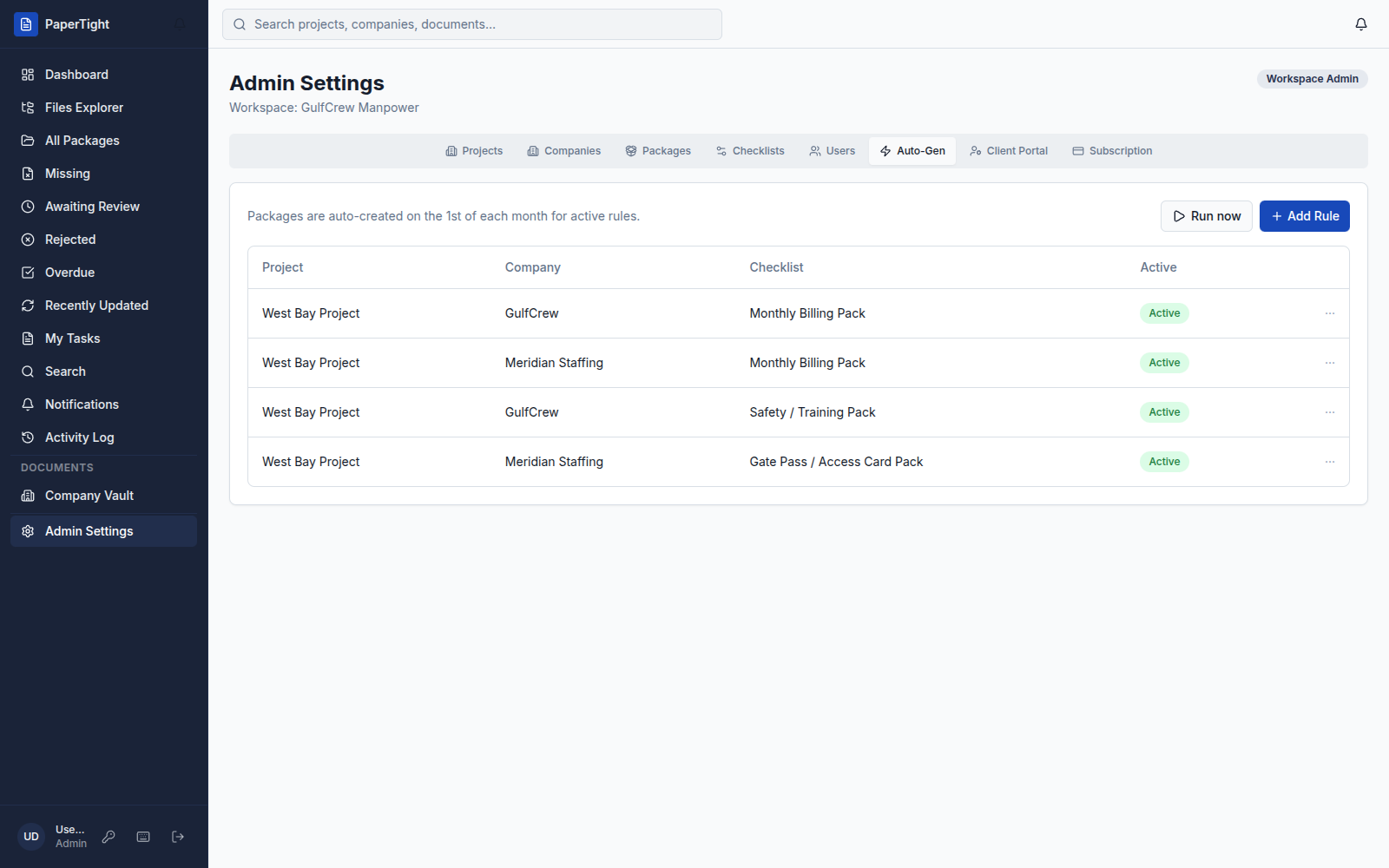
Recurring work should set itself up. An Auto-Gen rule pairs a project, a company, and a checklist — and on the 1st of each month PaperTight creates that package for you, with every required document slot already in place and waiting for uploads.

Need a period sooner, or a one-off? Hit Run now on any rule and the package is created on the spot. Auto-Gen is available on the Professional and Enterprise tiers.

papertight.com — Auto-Gen
PaperTight Auto-Gen screen: rules pairing a project, company, and checklist that create monthly packages automatically, each with a Run now action.

9 April 2026

The Company Vault

Not every document belongs to a billing period. Master agreements, purchase orders, gate pass request forms and other standing paperwork now live in the Company Vault — a permanent, company-level store that sits alongside your monthly and weekly packages instead of inside them.

Vault documents stay put as periods come and go, so the reference files a company always needs are one click away and never buried in an old package.

🗄️Company Vault
📄Master Services Agreement.pdfGulfCrew Manpower
🧾Purchase Order — PO-2291.pdfMeridian Staffing
🪪Gate Pass Request Form.docxCrewLine

12 March 2026

Full version history and the Activity Log

Nothing is ever overwritten. Every upload to a document slot is kept as its own version, and the per-slot Files history lets you open, compare, or restore any earlier one. When someone asks which timesheet got approved, the answer is right there.

Zoom out and the workspace-wide Activity Log records who did what and when — every upload, approval, rejection and edit — as a single audit trail across all your projects.

Timesheet — Files history
v3 · ApprovedAmina Rashid · 12 Mar
v2 · RejectedAmina Rashid · 9 Mar
v1 · SubmittedGulfCrew · 6 Mar

Also in this release

  • Keyboard shortcuts for moving through the review queues without the mouse.
  • Email notifications when a document lands in your queue or gets rejected.

20 February 2026

A read-only REST API, plus webhooks and SSO

PaperTight now opens up. The Professional tier includes a read-only REST API, so you can pull package readiness, document status and approvals into your own dashboards and reports without exporting a thing by hand.

On Enterprise we go further: the full REST API, webhooks that fire as documents move through the workflow, and SSO / SAML so your team signs in with your existing identity provider.

See plans and features for what each tier includes, and the security page for how we handle your data.

GET/v1/packages/awaiting-review
200 OK · returns 3 packagesGulfCrew · Monthly Billing Pack · 2 / 4 approvedMeridian Staffing · Gate Pass Pack · 1 / 3 approved

Want to see it all in one place? Take the product tour or request a demo.

Request a demo