The document control system for recurring paperwork
A document control system is software that keeps every document’s versions, approvals, and history in one controlled place instead of scattered across email threads and shared drives.
PaperTight is that system, built for recurring paperwork — packages per company, every version kept, an approval workflow, and an audit trail of who did what.
See the document control workflow step by step, or explore solutions for document-heavy teams.
Document collection
Collect every document.
Every recurring document set — one package, with a slot for every file you expect.
Packages →
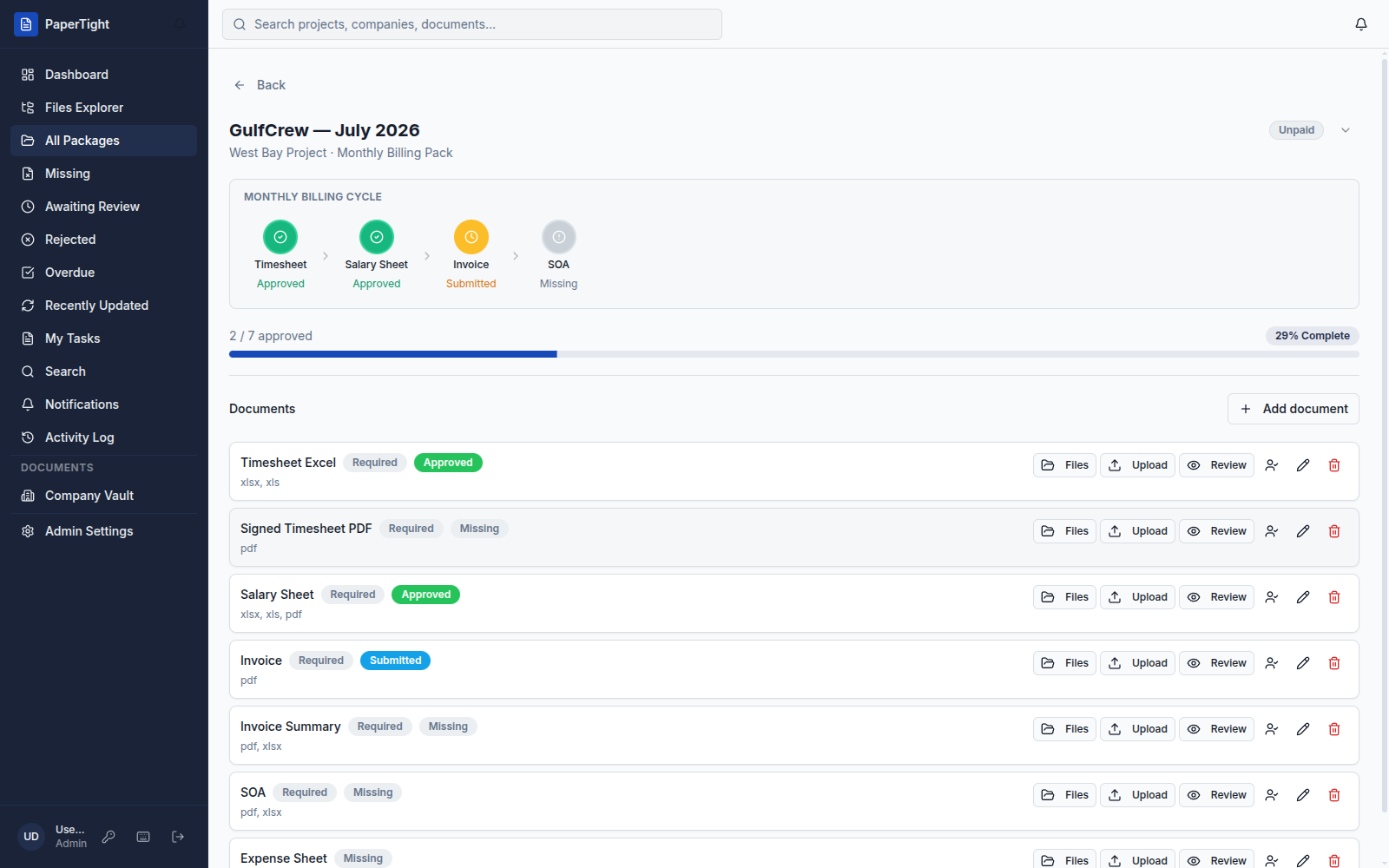
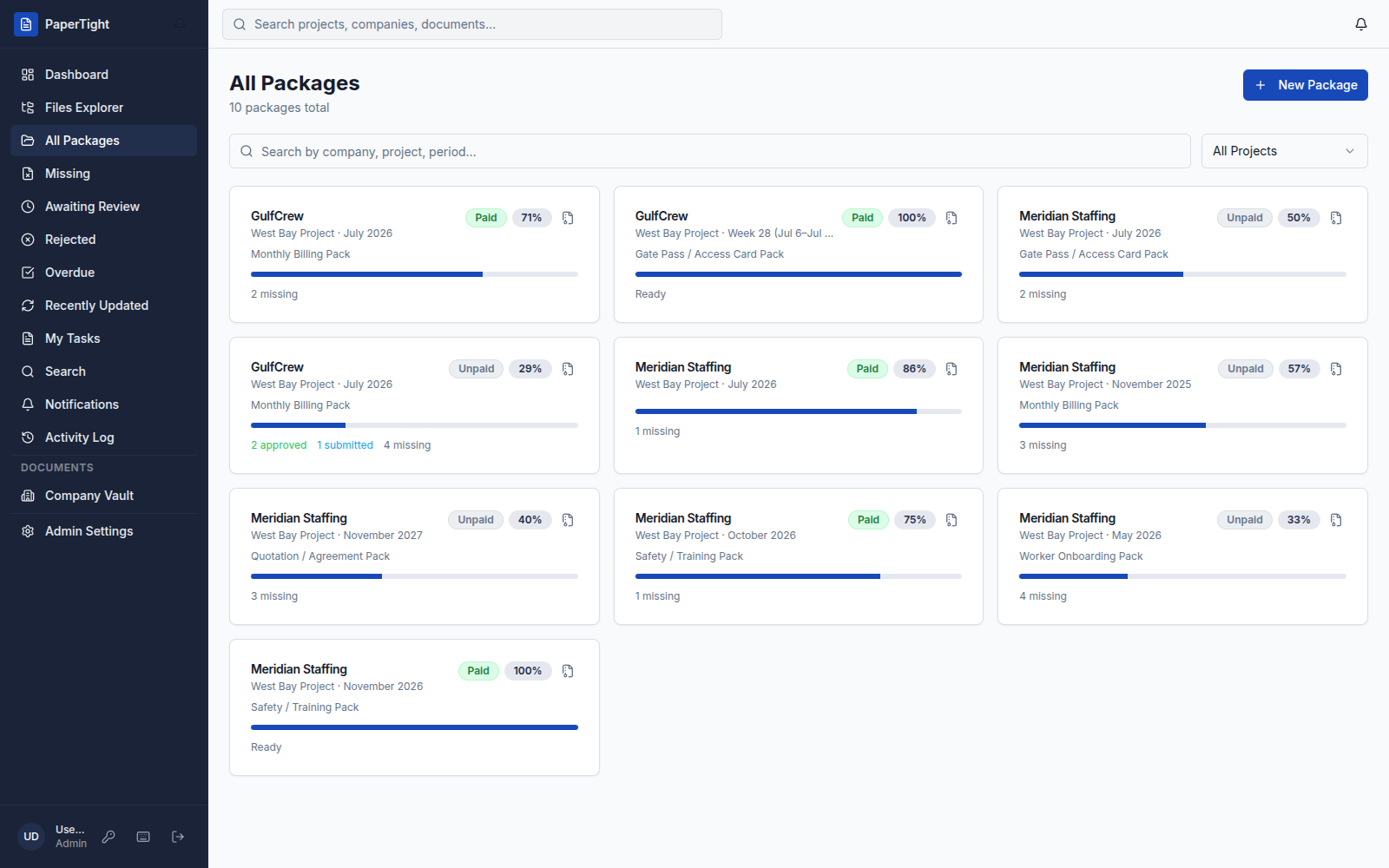
A recurring document set for one company and period — monthly or weekly — with readiness and approval counters.
Document slots →
One required file per slot — timesheet, salary sheet, invoice, SOA — each with allowed types and a live status.
Checklist templates →
Reusable packs for billing, gate passes, quotations, and onboarding, plus custom checklists of your own.
Company Vault →
Permanent company-level files — agreements, POs, Iqama copies, gate-pass forms — kept apart from period packages.
File types →
Excel, Word, and PDF stay the source of truth. PaperTight adds the control layer on top of the files you already use.
Files Explorer →
Browse every document across projects and companies from one place, without hunting through shared drives.
Search →
Find any project, company, or document in seconds — jump straight to the slot you need.
Recently Updated →
A running feed of what changed last, so you always know where the latest work landed.
Version history →
Every upload is kept. Roll back to any prior version of a document with the full trail intact.
Review & approval
Review with control.
Nothing gets marked done until the right person approves it — and everything is on the record.
Approve, reject, revise →
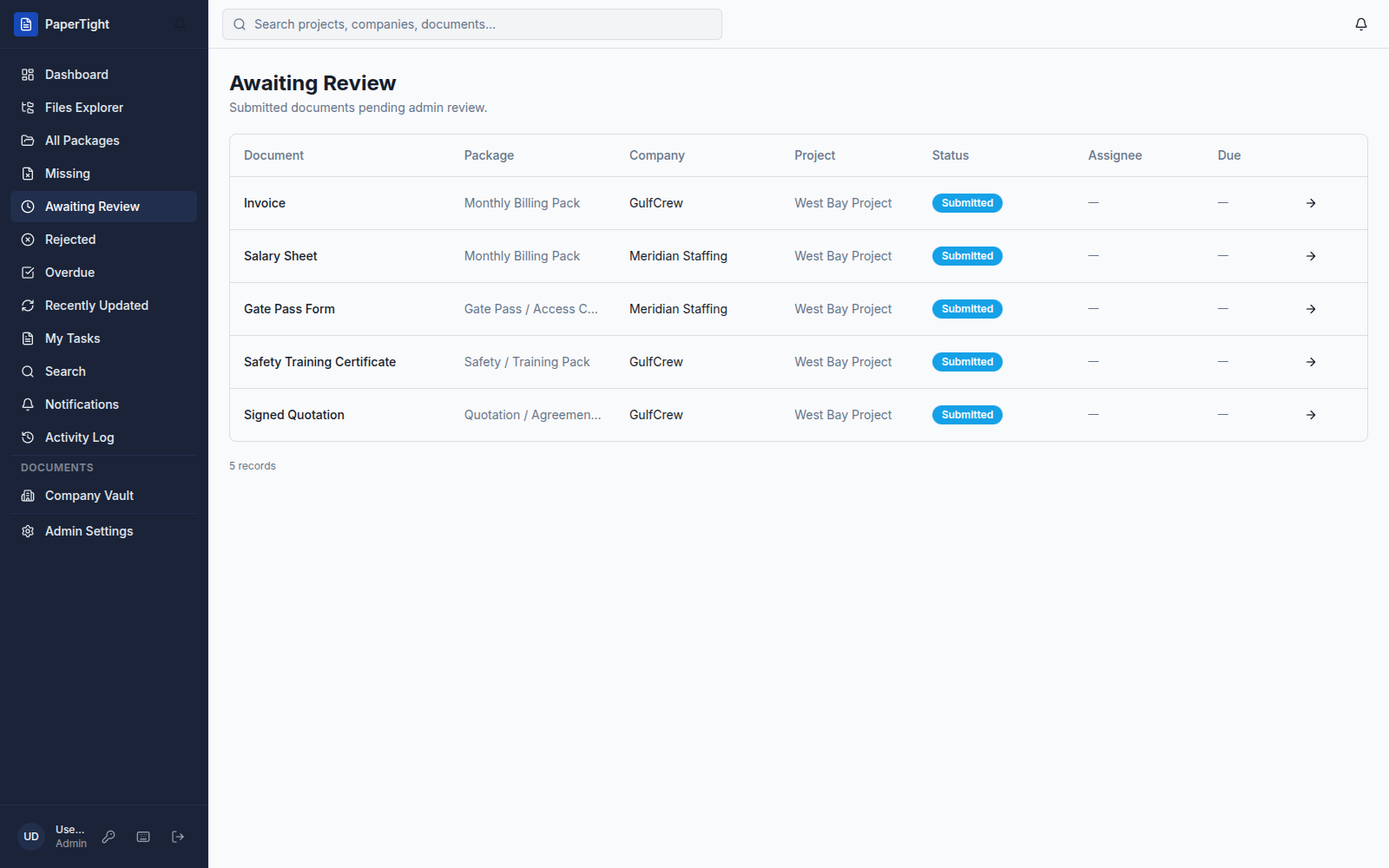
Decide on every submitted document with one action — approve, reject, or send back for a revision.
Awaiting Review queue →
A single list of everything submitted and waiting on you, so nothing sits unseen.
Missing & Overdue →
Dedicated queues surface the slots still empty and the ones that have slipped past their date.
Bulk approve / reject →
Clear a whole batch of documents in one pass instead of opening them one at a time.
My Tasks →
Everything assigned to you, gathered into one focused list you can work top to bottom.
Notifications →
Get told the moment a document needs your review or a decision lands on your work.
Activity Log →
A full audit trail of every upload, approval, and change — who did what, and when.
Payment status →
See Paid or Unpaid at a glance on every package, right beside its document readiness.
Readiness progress →
A live progress bar and “N / M approved” counter show exactly how close a package is to done.
Recurring cycles
Automate the cycle.
The same packages come around every period — let PaperTight open them for you.
Auto-generated packages →
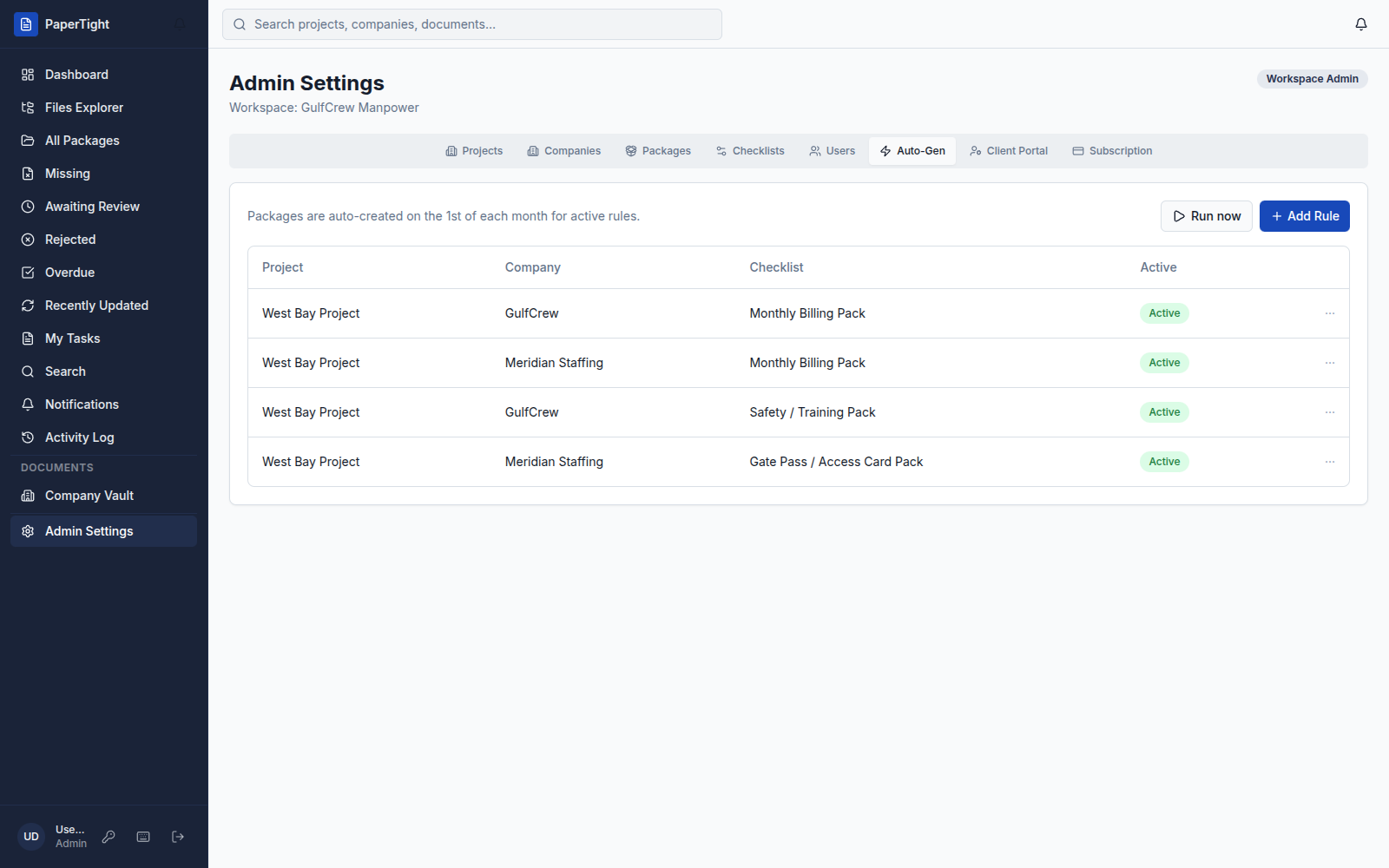
Rules open the right packages on the 1st of each month per project, company, and checklist — or run them now.
Weekly & monthly periods →
Match how each company actually bills, with recurring cycles set to weekly or monthly cadence.
Cycle stages →
Every billing cycle moves through Timesheet → Salary Sheet → Invoice → SOA, each tracked from missing to approved.
Overdue detection →
Slots that pass their date flip to overdue automatically and surface in the queues that need them.
Email notifications →
Automated emails keep coordinators and reviewers moving without anyone chasing a status by hand.
Keyboard shortcuts →
Fly through review and navigation with shortcuts built for people who live in the queues all day.
Teams & clients
Built for teams and clients.
One workspace for your staff, scoped access for every client, and the controls enterprises expect.
Workspaces →
Each customer gets an isolated tenant — one boundary that keeps projects, companies, and files fully separate.
Roles & permissions →
Workspace admins and staff get exactly the access they should, and nothing they should not.
Client Portal →
Clients log in and see only their own company’s documents — brandable on higher tiers.
Projects & companies →
Organise work by project, with every subcontractor and vendor company living neatly underneath.
SSO / SAML →
Bring your identity provider and sign in through SAML single sign-on on the Enterprise tier.
REST API →
Read your document data programmatically, with full read-write API access on Enterprise.
Webhooks →
Push events into your own systems as documents move through the workflow, on the Enterprise tier.
White-label & custom domain →
Serve the portal under your own brand and domain so clients see you, not us.
99.9% uptime SLA →
Enterprise-grade cloud infrastructure with a 99.9% uptime SLA and automated backups behind it.
Document control system FAQ
What is a document control system?+
A document control system is software that manages the lifecycle of business documents — capturing each version, routing documents for review and approval, and keeping a record of every change so a team always knows which file is current and who signed off. PaperTight adds this control layer on top of the Excel, Word, and PDF files you already use, rather than replacing them.
What features should document control software have?+
At a minimum, document control software should offer version control, a review-and-approval workflow, status tracking, and an audit trail. PaperTight provides all four: full version history on every file, approve / reject / request-revision decisions, readiness tracking with a live "N / M approved" counter, and an Activity Log that records every upload, approval, and change.
How does document version control work in PaperTight?+
Every time someone uploads a file to a document slot, PaperTight keeps it as a new version instead of overwriting the previous one. You can open a slot’s file history, see each version in order, and roll back to any prior version with the full trail intact. How long history is retained depends on your plan.
What is an approval workflow?+
An approval workflow is the review path a document travels before it counts as done: it is submitted, and a reviewer approves it, rejects it, or sends it back for a revision with a comment — only an approved document marks its slot complete. In PaperTight every submitted document lands in an Awaiting Review queue, and reviewers can act on one item or clear a whole batch with bulk approve / reject.
Does PaperTight keep an audit trail?+
Yes. The Activity Log records every upload, approval, rejection, and change — who did it and when — so you always have a defensible record of how each document reached approval. Paired with per-tenant workspace isolation, it gives you traceability across every project and company.
For how documents are protected in transit and at rest, see the security page.