Industry
Construction document control: the guide to subcontractor paperwork
Construction document control is the practice of collecting, versioning, reviewing, and approving project documents so the version on record is always the current, authorised one. Most articles on the subject mean one thing by it — drawings, RFIs, and submittals — but that is only half the discipline. The other half is the recurring commercial paperwork that runs a project’s back office, and almost nobody writes about it.
This guide covers that second half: the timesheets, salary sheets, invoices, statements of account, and gate passes that flow in from every subcontractor, every month — what they are, who controls them, why the usual email-and-spreadsheet approach breaks, and how the paperwork reality plays out in the UAE and the wider GCC.
What is document control in construction?
Document control in construction is the workflow that keeps every project document accurate, current, and approved — it decides who can submit a document, which version is authoritative, whether it has been reviewed, and whether it is signed off. On a live project it splits cleanly into two categories, and it is worth naming both honestly.
The first is technical documents: drawings, revisions, RFIs, submittals, specifications, and transmittals. This is the classic definition of construction document control, and the big platforms — Procore, Autodesk Construction Cloud, Newforma — are built around it. If your problem is a drawing register or an RFI log, those tools serve it well, and this guide is not trying to replace them.
The second is commercial and recurring paperwork: the documents that let the project pay people and bill the client. Every subcontractor produces a monthly stack — timesheets, salary sheets, invoices, statements of account — plus access paperwork like gate passes and one-time onboarding documents. It is just as much a document-control problem as the drawing set: the same questions about version, approval, and completeness apply. Yet it usually lives in an inbox and a tracking sheet. That is the half we focus on.
The monthly paperwork cycle nobody talks about
The commercial pack is not a random pile of files — it is a small production line, and the order is not decorative. Each document is built from the one before it, so a mistake early on compounds all the way to the statement.
It starts with the timesheet — the hours worked, agreed and signed. Those hours are priced into a salary sheet, which rolls up into an invoice, which is finally reconciled on a statement of account against what has been billed and paid across the relationship. Approve the timesheet before anyone touches pay, and the rest of the pack stays honest. Skip a gate and you are reviewing the same numbers twice.
Running alongside the billing cycle is the access paperwork: gate passes and access cards that get workers onto site, and the one-time onboarding pack a company hands over when it first joins — trade licence, insurance certificate, worker IDs, signed agreements. None of it is difficult individually. The difficulty is the multiplication.
With two or three subcontractors, email and a spreadsheet cope. At ten or more, the model breaks. An inbox has no concept of “what is expected” — it cannot tell you that one crew still owes a signed timesheet for July, because it does not know about the crew, the month, or the timesheet. Every status lives in someone’s head or a parallel tracker that is already out of date, and the moment two people chase the same document you have doubled the work and halved the trust. That is not a discipline problem you can fix with sharper reminders. It is a control problem.
What a construction document controller actually does
A construction document controller is the person who maintains the single source of truth for a project’s documents. The core duties are consistent across projects: register incoming files, control revisions so only the latest version circulates, route documents for review and approval, keep a clear record of who changed what, and track what is still outstanding. When an auditor or a client asks for the current version of a document, the controller is who can produce it without a scramble.
In practice the role splits across the same two halves the discipline does. Part of the week goes to drawing and submittal control — logging revisions, managing transmittals, keeping the RFI register current. The other part, rarely in the job title but very much in the job, is commercial document chasing: making sure every subcontractor’s monthly pack arrives, is complete, is reviewed, and is approved before the period can be billed. On projects with a large manpower supply chain, that second part can quietly become the larger one — and it is the part that no drawing-centric tool was built to help with.
Good controllers all reach for the same instinct: define what is expected before anything arrives. A drawing register lists the drawings a package should contain; a commercial checklist should list the documents a subcontractor owes for the period. The moment the expected set is explicit, the outstanding items become obvious instead of buried, and the controller’s job shifts from reconstructing status to simply reading it. That is the difference between a register that controls documents and a spreadsheet that merely records them after the fact.
Document control in the UAE and GCC
In the UAE and the wider GCC, the commercial half of document control is unusually heavy. Much of the workforce arrives through manpower-supply subcontractors, so a single main contractor may be collecting monthly timesheets, salary sheets, and invoices from a long list of labour suppliers. Site access runs on gate passes and access cards that have to be issued, tracked, and kept current. And client billing is typically a structured monthly pack — the paperwork bundle that has to be complete and consistent before a payment application goes in.
There is also a regulatory reason to get the commercial trail clean now. The UAE is rolling out mandatory electronic invoicing in stages: a voluntary pilot is expected from July 2026, with the mandate beginning in January 2027 for large businesses (broadly, those with annual revenue of AED 50 million or more), and a wider rollout following in July 2027. The practical effect is that invoice documents — and the timesheets, salary sheets, and statements that support them — will need clean, auditable trails, tied to the period and the party they belong to, rather than living as loose email attachments.
To be clear about scope: PaperTight is not an e-invoicing platform and does not issue, transmit, or clear invoices with any tax authority. What it does is manage the documents — keeping each subcontractor’s invoice and its supporting paperwork versioned, reviewed, approved, and easy to retrieve, so that whatever e-invoicing system you adopt is fed from an organised, auditable set of records rather than a shared drive.
How PaperTight handles construction document control
PaperTight is a control layer for the commercial half of construction document control. Your Excel, Word, and PDF files stay exactly as they are — the source of truth — and PaperTight adds the missing structure around them. Here is how the pieces fit together.
- ·Packages per subcontractor, per period. A package is one company’s document set for one month or week — its billing pack, its gate pass pack — built from a reusable checklist.
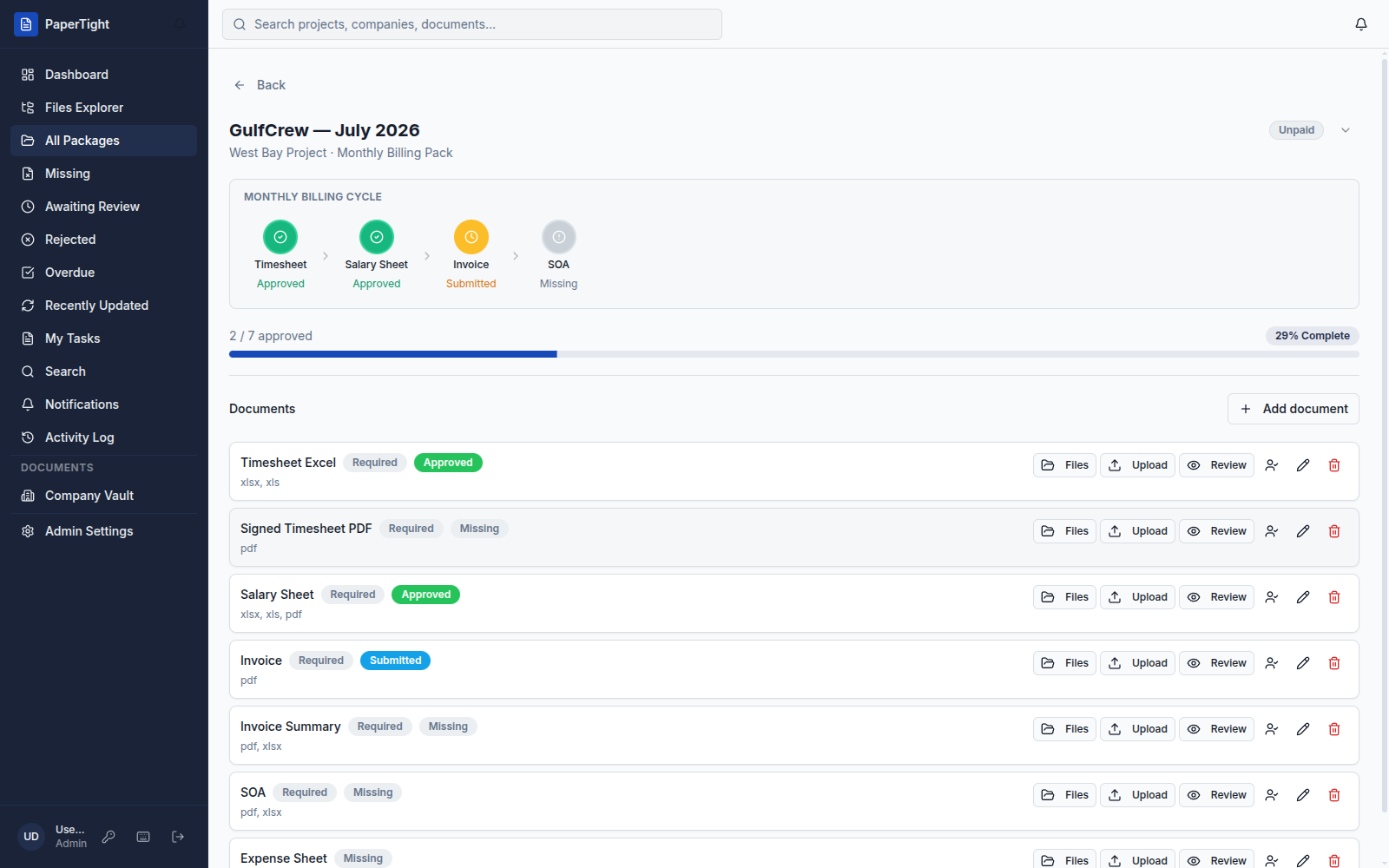
- ·Document slots. Each required file — timesheet, salary sheet, invoice, SOA — is a slot with allowed file types and a status: missing, submitted, approved, or rejected, with full version history.
- ·An approval workflow. Everything submitted lands in one review queue. Approve, reject, or send back for a revision with a comment — nothing counts as done until the right person signs off.
- ·A client portal. Subcontractors and clients sign in and see only their own company’s documents, uploading straight into the slots you defined.
- ·Auto-Gen on the 1st. A standing rule opens each recurring package automatically on the 1st of the period, so no period ever starts from an empty desk.
- ·Readiness tracking. A “N / M approved” counter and a readiness bar show a period’s status as a number, not a hunch — and name exactly which slot is holding up the pack.
If you want to see how this maps to your own paperwork, the solutions overview walks through the recurring packs it was built for, the product tour shows the packages, slots, and review queue on real screens, and the pricing page lists the member limits and features on each plan. Client-portal users — your subcontractors and clients — are free and do not count toward those limits.
None of this touches drawings, RFIs, or submittals — that half of construction document control belongs to the platforms built for it. PaperTight exists to give the other half, the commercial paperwork, the same discipline: one place to live, a single approval workflow, and a readiness view that shows exactly what is still outstanding.
Questions & answers
What is document control in construction?+
Document control in construction is the practice of collecting, versioning, reviewing, and approving project documents so the version on record is always the current, authorised one. It covers two halves: technical documents (drawings, RFIs, submittals, specifications) and the recurring commercial paperwork that runs the back office (timesheets, salary sheets, invoices, statements of account, and gate passes from subcontractors). The technical half is served by platforms like Procore, Autodesk Construction Cloud, and Newforma; the commercial half is usually left to email and spreadsheets.
What does a construction document controller do?+
A construction document controller maintains the single source of truth for project documents: registering incoming files, controlling revisions so only the latest version circulates, routing documents for review and approval, and tracking what is outstanding. In practice the role splits across two workloads — controlling drawings and technical submittals, and chasing the monthly commercial pack (timesheets, invoices, salary sheets, SOAs, gate passes) from each subcontractor before a billing period can close.
What is construction document control software?+
Construction document control software is a system that centralises project documents, enforces version control, and manages the review-and-approval workflow around them. Most incumbents focus on drawings, RFIs, and submittals. PaperTight focuses on the other half — the recurring commercial paperwork from subcontractors — organising it into packages per company per period, with document slots, an approval queue, and readiness tracking on top of your existing Excel, Word, and PDF files.
What documents do subcontractors submit every month?+
On a typical monthly billing cycle a subcontractor submits a timesheet (hours worked), a salary sheet (hours priced into pay), an invoice (the bill for the period), and a statement of account (the invoice reconciled against what has been billed and paid). Alongside these run access documents such as gate passes and access cards, plus one-time onboarding packs — trade licences, insurance, worker IDs, and agreements — collected when the company first joins a project.
Does PaperTight manage drawings and RFIs?+
No. PaperTight does not manage CAD drawings, submittals, or RFIs — that is the domain of tools like Procore, Autodesk Construction Cloud, and Newforma. PaperTight handles the recurring commercial paperwork that those tools leave to email and spreadsheets: monthly document packs from subcontractors and vendors, with version control, an approval workflow, and readiness tracking. If your problem is collecting and approving subcontractor timesheets, invoices, and gate passes every period, that is exactly what it is built for.
Control the paperwork half of your projects.
See a full month of subcontractor packs move from missing to approved in one workspace.